
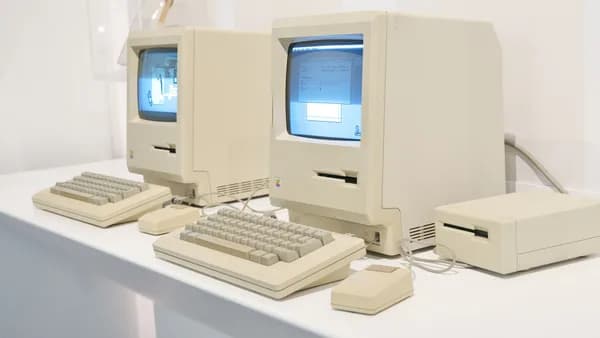
Tahoe marks the end of official macOS support for Intel Macs, but that doesn't mean your machine is destined for the landfill or a dusty closet. According to ZDNet, these durable computers can still receive security updates until around 2028, leaving you with a solid, capable machine that's just looking for a new purpose. You can transform it into anything from a 24/7 media server to a secure banking terminal, or even a dedicated workstation for cross-platform tasks considering new EU rules may soon improve data sharing between iPhones and Windows PCs. Here’s how to reclaim its value.

TechnologyAugust 4, 2026· 6 min read· By XOOMAR Insights Team
Don't Trash Your Intel Mac Yet: 6 Fresh Lives After Support Dies
Updated on August 4, 2026
XOOMAR Intelligence
Analyst Take
57/ 100
3 sources analyzedLow confidenceTrend10Freshness99Source Trust85Factual Grounding90Signal Cluster20
How to Transform Your Outdated Intel Mac into a Dedicated Streaming Hub
Your old Intel Mac has the specs to run circles around most pre-built streaming boxes. With Plex or Jellyfin, you can host your entire media library and stream it to any phone, tablet, or smart TV in your house—or even remotely.
First, optimize for continuous operation. Navigate to System Settings > Battery > Energy Saver and disable any sleep or display-off timers. Consider setting it to "Never" when connected to power. This ensures your server is always available.
Next, pick your software and set up libraries.
- Plex is user-friendly and excellent for sharing with family. Install the Plex Media Server, point it to folders containing your movies, TV shows, and music, and let it organize metadata.
- Jellyfin is a powerful, completely free and open-source alternative that doesn't require a login to a central service.
Best Practice for Organization: Keep your media files clearly organized by type (Movies, TV Shows, Music) in dedicated folders before you add them to your server software. This prevents duplicate or misidentified content. Finally, enable remote access in your server app's settings (usually under a "Remote Access" tab). You'll likely need to set up port forwarding on your router for secure, external streaming.
Turn Your Old Mac into a Rock-Solid Home File Vault
Instead of paying for cloud storage, use your Intel Mac as a centralized, physical backup for your entire home network. This serves as both a Time Machine backup destination for other Macs and a general file share.
Start with a clean slate: Erase the main drive and perform a fresh macOS install. This removes clutter and potential vulnerabilities.
"Navigate to System Settings > Sharing > File Sharing. The 'File Sharing' option allows you to add specific folders to share and manage access permissions," notes a related guide. You can create shares for family photos, important documents, or a software archive.
Then, connect a large external hard drive and set it up as a Time Machine backup destination for your primary Mac. On the old Mac, go to System Settings > General > Sharing, turn on File Sharing, and add the external drive as a shared folder. On your new Mac, select this network drive within Time Machine preferences. You now have an automated, networked backup system.
Repurpose It for Kids' Homework and Safe Internet Access
An Intel Mac makes a perfect, durable computer for a child's homework station. Its build quality can withstand more than a cheap Chromebook, and macOS still has years of security updates left for safe browsing.
Create a standard (non-admin) user account for your child. Then, dive into Screen Time settings in System Settings. Here, you can enforce strict limits on app and website use, set downtime schedules, and restrict content. Install free, educational software: LibreOffice replaces Microsoft Office for documents, GIMP offers basic photo editing, and apps like Scratch introduce coding concepts.
For browsing, consider setting the homepage to a kid-focused search engine and using the Screen Time web content restrictions to allow access only to websites you approve.
Convert Your Intel Mac into a Headless Home Automation Server
Running an automation server 24/7 is the ideal task for hardware you're not using daily. "Headless" means you set it up once, disconnect the monitor, and let it run in a corner, controlling lights, thermostats, and other smart devices.
Platforms like Home Assistant or Homebridge (which lets non-HomeKit devices work with Apple's ecosystem) run well on macOS. After installing, you can add devices from different brands—think Philips Hue, Wyze, or Ecobee—into a single, unified dashboard accessible from your iPhone or a web browser on any device.
The key benefit: You create powerful automations (like "turn off all lights and lower the thermostat at 11 PM") that don't rely on cloud services, making them faster and more reliable. This repurposing turns your Mac into the dedicated brain of your smart home.
Use It as a Secondary Secure Desktop for Banking and Finance
Security experts often recommend using a separate, locked-down device for sensitive financial transactions. Your Intel Mac, wiped and given a fresh install, is perfect for this.
The security advantage is stark: A machine used only for banking has a drastically smaller "attack surface." It won't encounter malicious links from email, risky downloads from general web browsing, or compromised software.
Create a dedicated user profile. Install only your bank's official app, a trusted password manager like Bitwarden or 1Password, and perhaps a VPN client. Keep the machine physically apart from your daily workspace—on a different desk or shelf—to discourage casual use and keep its purpose singularly focused. This approach leverages the Mac's remaining security updates to create a financial fortress.
Give It New Life as a Donated Learning Tool for Your Community
When you're ready to part with it, your functional Intel Mac can be a transformative gift. Schools, libraries, after-school programs, and non-profit community centers often welcome donations of working computers.
Before donating, perform a full, secure wipe: Use Disk Utility to erase the entire drive, then reinstall a fresh copy of macOS. To make it even more useful for the next user, consider pre-loading it with a folder of free, open-source software like LibreOffice, VLC media player, and Audacity for audio editing. A quick call to a local organization can confirm what they need most.
XOOMAR Analysis: Apple's pivot to its own silicon created a large, capable installed base of Intel Macs that are now officially "legacy." This guide, drawing on core ideas from ZDNet, shows they are far from obsolete. The value lies in their durability, performance for specific tasks, and the fact they still have a security runway until ~2028. This reality offers a counter-narrative to the industry's upgrade cycle. It also highlights a potential secondary market trend for durable hardware finding extended life in specialized, non-primary roles, a concept our previous coverage of Smartphone Subscriptions Turn iPhone Upgrades Into Habit explores from a different, more consumer-focused angle.
Watch This: The real test for these machines will come after 2028, when Apple presumably stops all security patches. At that point, options like installing a lightweight Linux distribution—mentioned in the original source—become not just creative, but necessary for secure continued use. The longevity of these Macs may ultimately depend on the open-source community, not Cupertino.
Key Takeaways
- Repurposing extends the life of expensive hardware, providing significant financial and environmental value.
- An Intel Mac can be repurposed into secure, dedicated hardware for critical tasks like banking or media serving.
- Continuing to use these machines for years provides practical alternatives to expensive subscription services or new hardware purchases.
Sources

Written by
XOOMAR Insights Team
Research and Editorial Desk
The XOOMAR Insights Team pairs automated research with human editorial judgment. We track hundreds of sources across technology, fintech, trading, SaaS, and cybersecurity, cross-check the facts, and explain what happened, why it matters, and what to watch next. We do not just rewrite headlines. Every article is fact-checked and scored for reliability before it goes live, and we link back to the original sources so you can verify anything yourself.
Explore More Topics
Related Articles
 Technology
Apple Must Let iPhones Paste to Windows PCs in EU
Europe's regulators are forcing Apple to break a key ecosystem lock, requiring it to let iPhone users copy text and paste it directly onto Windows PCs by 2027.
Aug 4, 20267 min
 Technology
Apple Accuses 11 Ex-Employees of Taking Secrets to OpenAI
Apple’s court filing reveals at least 11 former employees may have taken confidential product information to OpenAI, escalating a targeted legal attack on its A
Aug 4, 20266 min
 Technology
RAM Crunch Tests Apple Q3 2026 Earnings Boom as Costs Bite
Apple’s iPhone and Mac sales surged, but RAM shortages now threaten margins, pricing, and the next leg of its hardware boom.
Aug 2, 20268 min
 Technology
Apple's $11.1B Stockpile Exposes Supply Constraints Crunch
Apple's $11.1B inventory pile signals a costly supply crunch as memory prices threaten iPhone and Mac production.
Jul 30, 20268 min
 Technology
Apple Upgrade Hides iPhone Sticker Shock in Monthly Fees
Apple's lease plan turns rising device prices into smaller monthly payments, making premium hardware feel cheaper without cutting the real cost.
Jul 28, 20268 min
 Fintech
Italy's Central Bank Spent $200 to Prove Stablecoins Aren't Faster
A central bank experiment sending 200 USDC across real-world corridors found the process fragmented, costly, and slower than the instant payment systems it aime
Aug 4, 20265 min
 Technology
Grab CFO Credits AI For 30% Faster Shipping, 22% Revenue Jump
Grab CFO Peter Oey said AI is reducing core logistics costs by speeding up shipments over 30%, a metric tied directly to the company’s 22% revenue growth and a
Aug 4, 20269 min
 Cybersecurity
Attackers Hijack Email AI for CEO Fraud Heists
New research simulates how attackers hijack a compromised user's sanctioned email AI assistant to run reconnaissance, hide alerts, and craft executive impersona
Aug 4, 20265 min
 Cybersecurity
FBI Agent Stole $1M in Crypto from Monitored Nation State
An FBI agent used his access to steal $1 million in cryptocurrency from wallets his own national security unit was monitoring, leading to his arrest and a major
Aug 4, 202610 min
 Future Fiction
Cyclist Dies After Riding 5,200km For Charity At 82
An 82-year-old man completed a 5,200km cross-country bike ride for charity, celebrated with loved ones, and died peacefully the next day, closing a purposeful f
Aug 4, 20267 min
Don't miss the signal
Get our weekly roundup of the stories that matter across tech, fintech, and trading. No noise, just signal.
Free forever. No spam. Unsubscribe anytime.