For remote creative teams, working together across cities and time zones is now the norm, not the exception. The right cloud video editing remote teams platform isn't just a piece of software, it's the entire connective tissue that replaces the shared hard drive, the edit bay shoulder tap, and the painful client review loop. This comprehensive guide, grounded in 2026 research and expert analysis, compares the top tools designed to solve the unique friction points of distributed production, from asynchronous collaboration to secure, high-resolution asset management. The best choice hinges not on a checklist of flashy effects, but on how seamlessly a platform aligns with your team's specific workflow, scale, and editorial style.
The Rise of Asynchronous & Hybrid Creative Work
Remote video editing introduces challenges that simply don't exist in a traditional post house. When a team is distributed, you can't share a server across the hall or pass physical drives. According to industry analysis, distributed teams face three core hurdles that local teams don't:
- File Size: High-resolution video timelines generate massive files that can cripple traditional cloud storage like Google Drive or Dropbox, which often have low upload limits or compress files.
- Version Control: Without a single source of truth, teams descend into naming chaos with files like "final_v3_edits_REAL_FINAL.mov."
- Feedback Latency: The cycle of exporting, uploading, downloading, and re-exporting based on scattered feedback can add days to a project timeline.
The software you edit with matters less than the infrastructure connecting your team. Most guides focus on NLEs and plugins. This one focuses on the pipeline that makes remote work actually work.
The evolution of cloud-based tools has led to several distinct product categories, meaning there's no single "best" solution, only the best fit. Research categorizes these tools into four primary buckets:
- Browser-First Editors: Designed for speed, accessibility, and lightweight collaboration, ideal for quick publishing across devices.
- Cloud-Connected Desktop Editors: Offer the power and familiarity of traditional NLEs like Premiere Pro or DaVinci Resolve, augmented with cloud syncing, proxy workflows, and shared libraries.
- Review-and-Approval Platforms with Editing: Prioritize stakeholder feedback, version control, and team visibility, often adding light editing features to the core review function.
- Production Workflow Stacks: Focus on the entire pipeline, storage, proxy generation, transcription, asset organization, and publishing, rather than just the timeline.
Choosing between them starts with five critical questions about your team's workflow: Where does your source media live? How many people need to touch the project? How complex are your edits? How often do you revise after feedback? And how much can you depend on your team's local hardware?
Core Features to Look for in a Team-Focused Video Editor
Evaluating options requires moving beyond feature demos to analyze real-world workflow friction. A tool can look impressive yet fail at the points where your actual work happens. Use these seven criteria for any trial or comparison.
- Media Ingest & Syncing: The entry point is crucial. Look for simple upload from various sources, automatic proxy creation for smoother editing, clear status indicators, and shared project spaces, not one-person file ownership. The goal is to get footage into an editable state for the team as quickly as possible.
- Collaboration Model: Clarify your needs. Do you require true, simultaneous co-editing? Or is shared access with one active editor sufficient? For many teams, a robust review system for producers and clients is more critical than real-time timeline collaboration.
- Timeline Depth: Be honest about your needs. A short-form social edit may only require cuts, captions, and multi-format exports. A documentary may need multicam, advanced color grading, and plugin support. Overbuying creates unnecessary training overhead.
- Review & Approval Speed: This is often the deciding factor. Effective tools reduce feedback loops scattered across email and chat. Seek frame-accurate comments, shareable review links, approval state tracking, and easy version comparison.
- Performance Under Real Conditions: Test on imperfect connections (hotel Wi-Fi, home broadband). A browser editor that works smoothly with proxies may be more practical than a feature-rich desktop system that chokes outside an ideal lab setup.
- Asset Organization: As team size grows, so does the value of naming systems, shared folders, reusable templates, brand kits, and approved media libraries. This operational layer often creates more long-term value than the editor itself.
- Publishing Outputs: The right tool should simplify final delivery. Evaluate its ability to produce your required deliverables seamlessly: YouTube masters, Shorts, Reels, captioned versions, and audio excerpts.
Adobe Premiere Pro (via Frame.io): Industry Standard, Integrated Workflow
Adobe Premiere Pro, when paired with its integrated Frame.io extension, represents the paradigm of a cloud-connected desktop editor. It allows teams using the industry-standard NLE to layer powerful cloud collaboration features directly into their familiar workflow.
The integration focuses on streamlining the historically painful review and approval phase. Editors can export a cut directly from the Premiere Pro timeline to a Frame.io review link with one click. Stakeholders, who need no software installation, can then leave frame-accurate comments and annotations directly on the video stream. Those comments sync live back into the Premiere Pro timeline as markers, eliminating the need to manually match email or chat feedback to timecodes.
For many creator teams, a strong review system is more important than literal real-time co-editing.
This model is ideal for workflows where one or two core editors handle the complex timeline work, while multiple producers, clients, and subject-matter experts need to review and comment efficiently. It maintains the full power and plugin ecosystem of Premiere Pro for finishing while solving the primary collaboration bottleneck. At the time of writing, this approach requires managing subscriptions for both Creative Cloud and Frame.io.
DaVinci Resolve Cloud Collaboration: Powerhouse Grading & Multi-User Editing
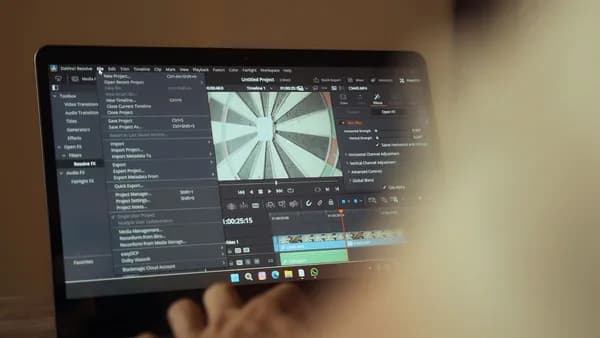
Blackmagic Design's DaVinci Resolve offers a unique, powerful model for cloud video editing remote teams, especially those with technically advanced needs. Its Cloud Collaboration feature allows multiple editors, colorists, and sound engineers to work simultaneously on different aspects of the same project, stored securely in the cloud.
A key differentiator is its sophistication in handling complex, multi-disciplinary workflows. For instance, an editor can be cutting a sequence in one location while a colorist applies grades in another, and a VFX artist works on composites, all in real time, with changes reflecting for all users. This is a significant step beyond simple file sharing or review-based collaboration.
The system is optimized for the high-end post-production pipeline Resolve is famous for, including its powerhouse Fusion VFX and Fairlight audio tools. It works by hosting project libraries on Blackmagic Cloud (or a private cloud server), enabling team members to "check out" timelines, bins, or individual clips, work on them, and "check in" the updated versions. This built-in version control prevents conflicts. This solution is particularly compelling for studios working on feature films, high-end commercials, or series where color fidelity and multi-user workflows are paramount.
WeVideo: Browser-Based Simplicity for Marketing & Social Teams
WeVideo stands out as a pure browser-first editor designed for accessibility and speed. It requires no software installation or powerful local hardware, making it an excellent choice for marketing teams, social media managers, educators, and distributed teams where not every member is a professional editor.
Its strength lies in facilitating lightweight collaboration and quick-turn projects. Team members can access the same project from any device with a web browser, making it easy for producers to make small tweaks or for social teams to repurpose a master edit into multiple aspect ratios. The platform often emphasizes shared media libraries, template systems, and brand kit functionalities, which are invaluable for maintaining consistency across a decentralized team producing recurring content formats like product explainers, interview clips, or social ads.
The trade-off is timeline depth. While WeVideo handles cuts, transitions, basic graphics, and audio editing well, it is not designed for the advanced color grading, multi-cam editing, or complex plugin workflows required for high-end cinematic work. Its value proposition is collaborative simplicity and operational speed over finishing prowess.
Blackmagic Cloud: A Deep Dive into the New Collaborative Ecosystem
While touched on with DaVinci Resolve, Blackmagic Cloud deserves its own examination as an emerging ecosystem. It's more than just a sync service; it's designed as a full production workflow stack. Beyond enabling Resolve's multi-user collaboration, it offers cloud-based storage, proxy generation, and seamless project sharing.
A key advantage for remote teams is the elimination of manual file management for proxies. Editors can upload full-resolution media to their Blackmagic Cloud storage, and the system can automatically generate optimized proxy files. Team members across the globe can then instantly access these proxies for editing within Resolve without needing to download massive RAW files, a critical feature for teams with varied internet speeds.
Furthermore, the ecosystem supports a unique "project sharing" feature via a simple link, allowing any Resolve user with permission to open and work on a project file directly. This tight integration between the desktop application and cloud services creates a cohesive environment that addresses storage, collaboration, and performance needs in one branded ecosystem. It is built for professional teams already invested in or moving to the DaVinci Resolve universe.
VEED.IO: Streamlined Workflow for Quick Turnarounds & Client Reviews
VEED.IO is frequently highlighted in 2026 roundups as a top contender for teams prioritizing streamlined workflows and client-facing efficiency. It is a browser-based editor that distinguishes itself with exceptionally strong integrated tools for transcription, captioning, and review.
Research indicates VEED.IO is "the best pick for teams that want browser editing with captioned exports for smoother remote review cycles." Its workflow is designed for speed: users can upload a video, generate accurate, editable subtitles directly on the timeline, make quick cuts and text-based edits, and then share a review link, all within the same browser interface. This is particularly powerful for interview-based content, educational videos, social media clips, and any project where accessibility (captions) and fast stakeholder approval are key deliverables.
The platform reduces friction by keeping the entire process, from editing to feedback collection, in one place. Clients and reviewers can leave timestamped comments on the shared link without creating an account. This makes it an ideal tool for agencies, freelancers, and content teams that need to produce professional, captioned video quickly and manage client revisions transparently without the overhead of a complex desktop NLE.
Comparison Matrix: Pricing, Storage, User Seats & Export Options
Choosing a platform requires comparing concrete attributes. The table below synthesizes available data from 2026 sources to highlight key differences. Note: Pricing and details can change; always verify on the official vendor sites.
| Platform | Core Model | Key Collaboration Strengths | Noted Pricing/Considerations | Best For |
|---|---|---|---|---|
| Adobe Premiere Pro (Frame.io) | Cloud-Connected Desktop | Industry-standard timeline; Deep Frame.io integration for frame-accurate review & comments. | Requires separate Creative Cloud & Frame.io subscriptions. | Teams anchored in Adobe ecosystems needing robust review integrations. |
| DaVinci Resolve (Cloud) | Cloud-Connected Desktop / Ecosystem | True multi-user simultaneous editing, grading, & audio; Blackmagic Cloud proxy workflows. | Resolve Studio is a one-time fee; Blackmagic Cloud has subscription storage plans. | Advanced post teams needing real-time collaboration across specialties. |
| WeVideo | Browser-First Editor | Device-agnostic access; Shared libraries & templates; Simple, intuitive interface. | Typically offers tiered SaaS subscriptions with varying storage & features. | Marketing/social teams, education, and beginners needing easy collaboration. |
| VEED.IO | Browser-First Editor | Integrated transcription & captioning; Streamlined client review links; Fast social repurposing. | Freemium model; Paid tiers unlock longer videos, more storage, and advanced features. | Teams requiring fast, caption-focused edits and smooth client feedback loops. |
| Evercast | Real-Time Collaboration Platform | Ultra-low-latency, high-fidelity (4K, 10-bit) streaming of any desktop app; Virtual "in-room" experience. | Plans start at $549/month. High price point for independent creatives. | High-end studios requiring real-time, color-accurate collaborative sessions. |
Security & Compliance Considerations for Cloud Video Projects
When media assets and pre-release projects move to the cloud, security becomes a non-negotiable priority. Different tools cater to different levels of need.
For most corporate and marketing teams, standard platform security (encryption in transit and at rest, secure login) is sufficient. However, for teams working with sensitive content, unreleased intellectual property, or under strict contracts (common in film, TV, and agency work), deeper measures are required.
Some platforms, like Evercast, are built with this high bar in mind, boasting security protocols approved by major Hollywood studios and certification from the Motion Picture Association’s Trusted Partner Network (TPN). Other considerations include:
- Permission Roles: Granular controls defining who can view, comment, edit, or export.
- Data Residency: Knowing where your files are physically stored, which may be relevant for regional compliance.
- Access Logs: Auditable records of who accessed which asset and when.
- Client Sharing: Secure, branded portals for external stakeholders that don't expose your internal project structure.
The foundational rule for any team is to use organization-owned storage and accounts. This prevents a freelancer's departure from meaning the loss of critical project files, ensuring company assets remain under company control regardless of who uploaded them.
Conclusion: Choosing the Right Platform for Your Team's Scale & Style
The search for the best cloud video editing remote teams software doesn't end with a single winner; it ends with the tool that best fits your team's specific constraints and creative rhythm. The choice is a strategic one, aligning technology with your operational reality.
- Choose a Browser-First Editor (WeVideo, VEED.IO) if your priority is maximizing accessibility, speed, and simplicity for cross-functional teams working on shorter-form, repurposable content where review cycles and captioning are central.
- Choose a Cloud-Connected Desktop Editor (Premiere Pro + Frame.io, DaVinci Resolve) if your work demands the full power of a traditional NLE for complex timelines, advanced finishing, and a rich plugin ecosystem, and you need to layer sophisticated cloud collaboration (review or real-time multi-user) on top.
- Choose a Specialized Collaboration Platform (Evercast) if your team operates at the highest professional tier, requiring a true, real-time, color-accurate "virtual edit bay" experience for remote reviews and sessions, where latency and fidelity are critical.
- Invest in Core Infrastructure regardless of your editor choice. Ensure you have cloud storage that handles large files without compression, utilizes streaming preview for client reviews, and enforces a consistent folder and naming structure from the outset.
Start by mapping your actual workflow friction points: Is it the upload speed? The chaos of feedback? The inability to find assets? Then, trial the platforms that target those specific pains. The right cloud video editing solution shouldn't just let you edit remotely; it should make your entire distributed team more creative, efficient, and cohesive.
FAQ
What's the difference between cloud editing and remote editing? "Cloud editing" typically refers to software where the primary editing interface and/or project files reside online (browser-based or cloud-synced). "Remote editing" is the broader practice of editing from a distributed location, which can be enabled by cloud tools, virtual machines, or simply sending files back and forth. Cloud editing platforms are designed specifically to solve the challenges of remote editing.
Can multiple people edit the same video project at the same time? Yes, but the implementation varies. Platforms like DaVinci Resolve Cloud Collaboration allow true simultaneous editing on the same project. Others, like many browser editors, may allow shared access but only one active editor at a time. Most platforms excel at allowing multiple people to review, comment, and approve simultaneously.
Do I still need a powerful computer for cloud video editing? It depends on the model. For browser-first editors, the required processing is largely handled in the cloud, so you can work on less powerful hardware. For cloud-connected desktop editors, your local machine still does the heavy lifting of rendering timelines and effects, so powerful specs are still needed. Cloud features add collaboration on top of that local performance.
How do we handle huge video files with slow internet upload speeds? This is a core challenge. The best solutions involve automatic proxy generation. You or an assistant upload the large, original files once (potentially overnight). The cloud platform then creates small, lightweight proxy files that other team members can download and edit with quickly. The system automatically relinks to the high-resolution originals for the final export.
Is cloud video editing secure for confidential client projects? Security levels vary. Reputable platforms employ enterprise-grade encryption for data at rest and in transit. For highly sensitive projects (e.g., unreleased films), seek out platforms with specific industry certifications, like the Motion Picture Association’s Trusted Partner Network (TPN) approval, and features like detailed access logs, watermarking, and no-download streaming review.
What happens to our projects if we cancel a subscription? Policies differ, but a major risk is losing access to your stored assets and project files. Always review the platform's data retention policy before committing. A best practice is to maintain your own organization-owned master archive of original media and final exports on separate, controlled storage to avoid vendor lock-in.
Bottom Line
The landscape for cloud video editing remote teams in 2026 is diverse, offering specialized solutions for different needs. VEED.IO and WeVideo lead for browser-based simplicity, rapid review, and caption-focused workflows. Adobe Premiere Pro integrated with Frame.io remains the gold standard for professional teams embedding collaboration into an industry-standard NLE. DaVinci Resolve and Blackmagic Cloud offer unparalleled power for multi-user, real-time collaboration across complex post-production disciplines. For the highest-fidelity virtual edit sessions, Evercast provides a specialized, high-cost solution. Success lies not in finding the "best" tool, but in rigorously matching a platform's strengths, whether it's streamlined review, asset management, or simultaneous editing, to your team's most persistent workflow frictions.