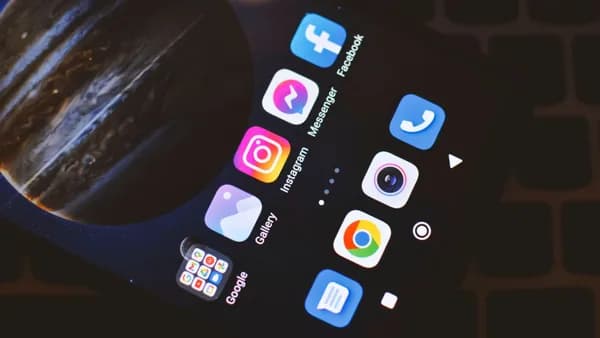
You can stop Meta AI from using your public Instagram photos in future Muse Image generations, but you can’t erase AI images that were already created with your content.
XOOMAR Intelligence
Analyst Take
That’s the tension in Meta’s rollout: users might expect Instagram photos to stay inside Instagram unless they choose otherwise, but adult public profiles are opted in by default, according to Tom's Guide. The practical fix is buried in Instagram’s Sharing and reuse settings. This guide walks you through the fastest Meta AI Instagram photos opt out path, plus the limits you need to understand before you assume you’re protected.
“You won't be notified when this happens,” Tom’s Guide reported of Meta’s AI image feature.
1. Public Instagram was treated as consent, so check your exposure first
Start by confirming whether your Instagram account is public or private.
The highest-risk group in the source material is clear: adult public Instagram profiles. Meta has blocked the tool from automatically targeting users under 18 and users with private profiles, according to Tom’s Guide. Everyone else with a public adult account is opted in unless they change the setting.
Here’s the before and after:
| Account status | Default exposure described in the source | What to do |
|---|---|---|
| Public adult profile | Automatically opted in | Turn off the reuse toggles |
| Private profile | Not automatically targeted | Still review settings if available |
| Under 18 | Not automatically targeted | No action described in the source |
Watch out for the biggest limitation: turning the setting off only blocks future use. Tom’s Guide says generated images won’t be deleted if you change your settings later.
2. Don’t hunt for a broad AI-training form, use the verified Instagram setting
The verified control in the supplied reporting is not a general Meta AI training objection form. It is an Instagram setting that stops people from using your Instagram content with Meta’s AI features when they tag your username in image prompts.
That distinction matters. The story is about AI image generation and content reuse, not a confirmed universal opt-out from all AI training across Meta.
If you’ve followed our coverage of the launch in Meta Muse Image Crashes Into Instagram, WhatsApp Chats, the Meta AI privacy issue sits inside the product design: Muse Image connects AI image prompts to public Instagram profiles through @-mentions. The setting you want is therefore inside Instagram’s sharing controls.
3. Open Instagram’s menu and find Sharing and reuse
Open the Instagram app and make sure you’re signed into the account you want to protect. This matters if you manage multiple personal, creator, or business profiles.
Then follow this path:
- Tap your profile icon in the bottom-right corner.
- Tap the three horizontal lines in the top-right corner.
- Open the menu labeled Settings and activity on updated devices.
- Scroll until you find Sharing and reuse.
- Look for: Allow people to use your content on Instagram and with AI features on Meta.
That wording is the important signal. If you see it, you’re in the right place for the Meta AI Instagram photos opt out setting.
Watch out for menu differences. Tom’s Guide says the interface can vary depending on app version, including whether you see separate toggles for different content types.
4. Turn off every available content toggle, not just photos
Inside Sharing and reuse, Instagram may show separate toggles for posts, Reels, and original audio, depending on your app version.
Turn them all off.
The source says this prevents Meta AI from using your Instagram content when people tag your username in image-generation prompts. Once disabled, people can no longer generate AI images using your content through that setting, and they can’t reuse your audio clips to create new AI content.
Use this checklist:
- Posts: Turn off if shown.
- Reels: Turn off if shown.
- Original audio: Turn off if shown.
- Any similarly worded AI reuse toggle: Turn off if it sits under the same “Allow people to use your content…” section.
Don’t leave one toggle on because you mostly care about photos. The risk described by the source includes public Instagram content being pulled into AI features, and the safest move is to disable every option Instagram gives you in this section.
5. Switching to private adds protection, but it changes the account
Meta has blocked Muse Image from automatically targeting private profiles, according to Tom’s Guide. So if you don’t need a public account, switching to private is a strong second layer.
To do that, use Instagram’s account privacy controls and turn on Private account.
This is not a replacement for the opt-out toggle if you still see it. Treat it as a separate barrier. The reuse toggle tells Instagram not to allow this AI use. A private account reduces the amount of content that sits in the public lane.
For creators, journalists, founders, artists, and small businesses, going private may be too blunt. If the account needs public reach, keep it public but complete the Sharing and reuse opt-out immediately.
6. Assume you won’t be warned when someone uses your profile
The most user-hostile part is not only the default. It’s the silence.
Tom’s Guide reports that anyone can tag your username with an @-mention in a prompt, and Meta AI can remix your public photos into the image they’re creating. You won’t receive a notification when that happens.
That means your practical process should be defensive:
- Act now: Don’t wait for an alert. The source says there won’t be one.
- Check every account: If you run more than one public Instagram profile, repeat the setting change on each.
- Don’t assume deletion: Images already generated won’t disappear after you change the toggle.
- Recheck after app changes: If Instagram changes labels or feature placement, confirm the reuse controls are still off.
This is the same broad trust problem we flagged in Tiny Light Fails Meta Smart Glasses Privacy Trust Test: users shouldn’t have to decode subtle product behavior to know when their likeness or surroundings are being captured or reused.
7. Archive or delete public posts you don’t want feeding future prompts
After you turn off the setting, review your public grid. This step won’t undo past AI generations, but it can reduce what remains publicly available.
Focus first on content where misuse would create the most harm:
- Clear face photos: Especially close-up portraits.
- Family images: Particularly photos involving children.
- Location-heavy posts: Travel, home, school, office, or event context.
- Reels: They may have a separate toggle, but review the content itself too.
- Profile photos: They are often more visible than old posts.
Instagram gives users options such as hiding content through account controls or removing posts. Use the least destructive option that fits your risk tolerance. If a post is important for your work, you may decide to keep it public. If it’s personal and no longer needs to be public, take it out of view.
8. Treat this as a future-use control, not a cleanup button
The Meta AI Instagram photos opt out setting is useful, but it has a hard boundary. Tom’s Guide says generated images won’t be deleted even if you change your settings later.
So the clean mental model is:
- Before opt-out: Public adult accounts may already be usable in Muse Image prompts.
- After opt-out: Future username-tag generations should be blocked through this setting.
- Past generations: The source says they remain.
That creates a real asymmetry. Meta made the default broad, but the user fix only works going forward. For anyone whose face is part of their livelihood, including creators and public-facing professionals, the delay matters.
9. Change how you post if you keep Instagram public
If you need a public Instagram account, the safer habit is to treat every public post as potentially reusable unless your settings clearly say otherwise.
Practical changes:
- Use private sharing for personal images when you can.
- Separate public brand content from private life if your account mixes both.
- Limit high-quality personal portraits on public profiles.
- Remove sensitive context before posting, including details that identify home, work, school, or routine locations.
- Revisit Sharing and reuse after major Instagram updates or after changing account type.
This is analysis, not a new claim from Meta: defaults shape behavior. If a platform makes reuse automatic and places the stop button in settings, the burden shifts to users who notice the change.
10. The fastest safe path from here
Do this now:
- Open Instagram.
- Go to Profile.
- Tap the three horizontal lines.
- Open Settings and activity.
- Find Sharing and reuse.
- Under Allow people to use your content on Instagram and with AI features on Meta, turn off every available toggle.
Then decide whether your public profile still needs to be public. If not, switch it to private. If yes, audit older posts and remove anything you wouldn’t want used as a visual reference in an AI image.
The opt-out is worth doing, but it isn’t magic. The next thing to watch is whether Meta keeps this control stable, visible, and account-specific as Muse Image expands across more AI features.
Key Takeaways
- Adult public Instagram users may have their photos used in future Meta AI image generations unless they opt out.
- Changing the setting only blocks future reuse and does not delete AI images already created with your content.
- The opt-out control is inside Instagram’s Sharing and reuse settings, not a broad AI-training form.
Instagram account exposure to Meta AI image reuse
| Account status | Default exposure described | What to do |
|---|---|---|
| Public adult profile | Automatically opted in | Turn off the reuse toggles |
| Private profile | Not automatically targeted | Review settings if available |
| Under 18 | Not automatically targeted | No action described in the source |
Primary Sources & Disclosures

Written by
XOOMAR Insights Team
Research and Editorial Desk
The XOOMAR Insights Team pairs automated research with human editorial judgment. We track hundreds of sources across technology, fintech, trading, SaaS, and cybersecurity, cross-check the facts, and explain what happened, why it matters, and what to watch next. We do not just rewrite headlines. Every article is fact-checked and scored for reliability before it goes live, and we link back to the original sources so you can verify anything yourself.