Flipper Devices’ Busy Bar puts a $249 price tag on a simple bet: desk workers will pay for a physical signal that says when they’re focused, in a meeting, or not to be interrupted.
XOOMAR Intelligence
Analyst Take
The London-based maker of the Flipper Zero is moving into productivity hardware with Busy Bar, a customizable LED desk display that will go on open sale next month, according to TechCrunch. The sharper question is whether Flipper can turn a brand known for hacker tools into one that sells mainstream work gear.
Can Flipper Busy Bar turn a hacker brand into a productivity hardware seller?
Flipper Devices built its name with Flipper Zero, a pocketable tool used by hackers and tinkerers to interact with radios including Bluetooth, RFID, NFC, and a sub-1GHz transceiver. Busy Bar is a different play: less signal probing, more signal sending.
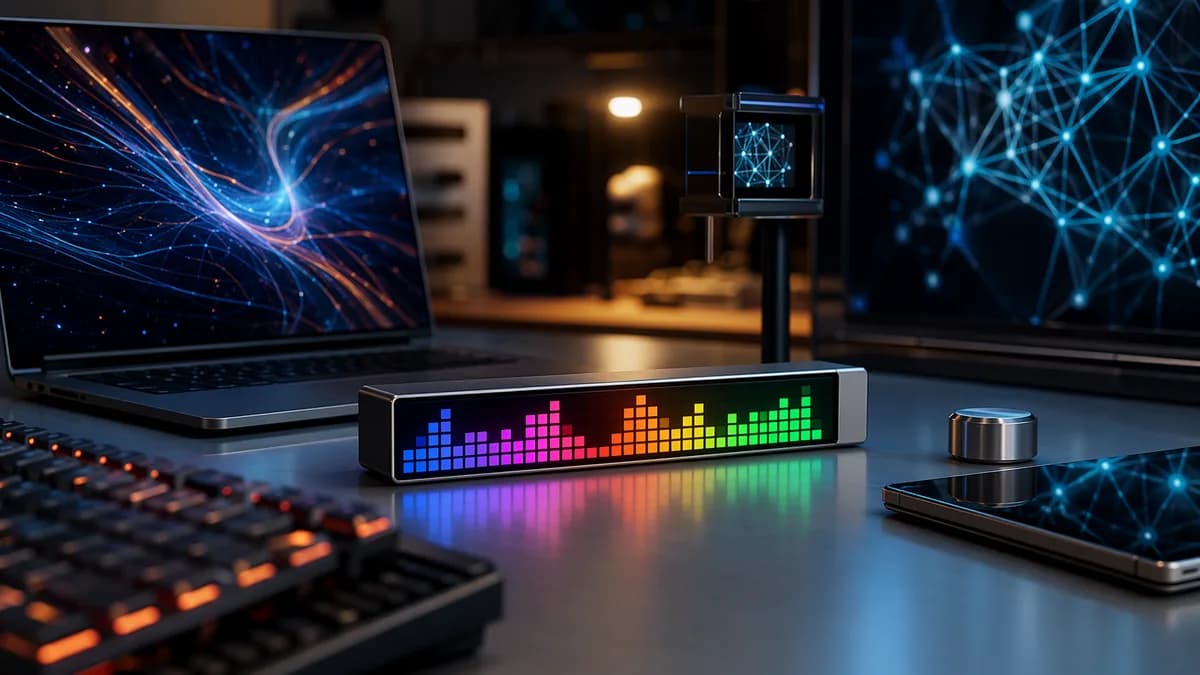
The device looks like a small table clock loaded with buttons and knobs. Its front face uses a 72×16 LED matrix display with up to 400 nits of brightness, support for 16 million colors, and an automatic brightness sensor. The back adds a monochrome status screen so users can see timer, battery, and connectivity information even when the main display faces away.
Flipper first announced Busy Bar last year. Now it is preparing to sell it. The first 3,000 buyers on the waitlist can purchase it for $199, while everyone else pays $249. Sales and shipping are set to begin from July 14 in the US, EU, UK, and Canada.
That makes Busy Bar a premium desk accessory, not an impulse-buy timer. The pitch is that it can replace several scattered cues: a meeting indicator, a focus timer, an app blocker, a smart-home trigger, and a programmable mini-display.
“Stop others from interrupting your deep focus. The display shows you’re busy and when you’ll be free again,” Flipper says on the Busy Bar product site.
What does Busy Bar actually do on a desk?
Busy Bar is built around visible status. A user can display a custom message, set a Pomodoro-style timer, show widgets, or tell people nearby that they’re unavailable.
That matters most in shared spaces. In a work-from-home setup, the display can face a room or a door. In an office, it can sit on a desk as a hard-to-miss availability cue. The device also includes a side speaker for custom sounds and notifications.
The physical controls are central to the design. On top, Busy Bar has a mode selector switch, a start/stop button, an indicator, and a scroll wheel for menus and timer settings. It supports Wi-Fi, Bluetooth, and USB.
| Busy Bar function | What it does | Platform or hardware detail |
|---|---|---|
| Status display | Shows custom messages, meeting status, or widgets | 72×16 LED matrix, 16 million colors |
| Focus timer | Runs Pomodoro-style work blocks | Scroll wheel and physical start/stop control |
| App blocking | Blocks selected apps with timers | iOS and Android apps |
| Meeting detection | Shows “on call” status and mutes notifications | macOS microphone integration |
| Smart-home actions | Triggers automations based on status | Matter-certified, per TechCrunch |
| Developer control | Supports custom widgets and integrations | Open firmware, HTTP API, MQTT, Python and TypeScript libraries |
Flipper is releasing apps for iOS, Android, and macOS, with Windows support planned. On iOS and Android, users can block selected apps with different timer types. On macOS, the microphone integration can show an “on call” status and mute notifications when the user joins meetings, starts recording, or begins streaming.
Busy Bar also has a 3250 mAh battery, rated for up to eight hours of active status time and up to two weeks of standby time. With a 15W adapter, Flipper says the device can fully charge in an hour.
For readers tracking single-purpose work hardware, Busy Bar sits near the same broader conversation as BYOK Turns a $199 Plastic Slab Into a Writer's Escape. The difference is clear: BYOK strips the workspace down, while Busy Bar adds a visible control layer to it.
Does the $249 price make sense for a status display?
At $249, Busy Bar has to do more than flash “busy.” A cheap timer can handle focus blocks. Calendar software can show meeting status. Phone and desktop settings can mute notifications.
The case for Flipper Busy Bar is that it pulls those signals into one visible, programmable device. Its appeal overlaps with desk timers, status lights, smart displays, and notification widgets, but its selling point is customization: messages, widgets, app blocking, smart-home actions, and developer-built behavior.
XOOMAR analysis: the price is the pressure point. Busy Bar makes the most sense for users who already feel pain from interruptions, context switching, and scattered notification controls. If someone only wants a Pomodoro timer, this is expensive. If they want a physical automation endpoint for focus status, calls, app blocking, and smart-home triggers, the price has a clearer argument.
The smart-home angle is more than decoration. TechCrunch reports that Busy Bar is Matter-certified, which means it can work across Amazon, Apple, and Google-based smart-home setups. In practice, that could let a Busy Bar status change trigger lights, music, or other automations.
Flipper also plans accessories including wall mounts, screen protectors, and custom switches. That suggests the company sees Busy Bar not only as a desk object, but also as something users may mount on a wall or door.
Can software support keep Busy Bar from becoming desk clutter?
The hardware is only half the story. Busy Bar’s fate depends on how cleanly its apps and integrations work.
Buyers will want to know which apps it supports, how reliable the app blocking is, how easy it is to design custom statuses, and whether the macOS meeting detection behaves predictably. Windows support is planned, but not yet part of the launch package described by TechCrunch.
The developer layer could be Flipper’s advantage. The company is making Busy Bar suitable for customization with open firmware, an open HTTP API, MQTT, and official Python and TypeScript libraries. Users can also control the device over the internet through a cloud API.
That gives Flipper’s existing tinkerer audience a reason to care. They can build widgets, status logic, or workflow hooks that Flipper does not ship on day one. It also gives mainstream buyers a risk: if useful add-ons take time, the device may feel more promising than essential at launch.
The practical comparison for buyers is simple. A device like the BYOK writing tool tries to protect attention by removing general-purpose computing from the task. Busy Bar tries to protect attention by broadcasting status and controlling interruptions around the task.
The next test starts on July 14. Watch the first buyer and reviewer feedback on setup friction, app support, app blocking, meeting detection, and whether developers build genuinely useful widgets. If those pieces click, Flipper Busy Bar becomes a programmable control surface for focus. If they don’t, it risks becoming a clever desk toy with a premium price.
Key Takeaways
- Busy Bar tests whether workers will pay a premium for a physical productivity signal.
- The product marks Flipper Devices’ move beyond hacker tools into mainstream desk hardware.
- Its $249 price makes adoption depend on whether users see it as more than a novelty display.
Flipper Zero vs. Busy Bar
| Device | Primary purpose | Key capabilities | Positioning |
|---|---|---|---|
| Flipper Zero | Hacker and tinkerer tool | Interacts with Bluetooth, RFID, NFC, and sub-1GHz signals | Built Flipper Devices’ hacker-focused brand |
| Busy Bar | Productivity desk display | Shows focus status, timers, meeting cues, app blocking, and smart-home triggers | Pushes Flipper into mainstream work hardware |
Busy Bar Pricing
Primary Sources & Disclosures

Written by
XOOMAR Insights Team
Research and Editorial Desk
The XOOMAR Insights Team pairs automated research with human editorial judgment. We track hundreds of sources across technology, fintech, trading, SaaS, and cybersecurity, cross-check the facts, and explain what happened, why it matters, and what to watch next. We do not just rewrite headlines. Every article is fact-checked and scored for reliability before it goes live, and we link back to the original sources so you can verify anything yourself.